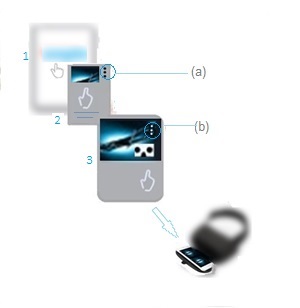
As illustrated above,
1 – Touch the Category of your choice
2 – Touch the video to preview
3 – Touch the VR icon
Notice the(3) dots
(a) While listing videos ,
you may touch the dots to build a Play list
tip
If you touch a video and the VR icon doesn’t appear, it may not be a VR Video. VR Videos normally have at least one the following in their titles: VR – 360 – VR180
(b) While Previewing a video ,
touch the dots to check the video quality
If lower than 1080, VR viewing quality will be poor.
Change it to 1080 or above as supported by your phone and Wifi speed.
tip
Regular Videos can still be seen as IMAX using the R-Headset. Simply touch the dots – then [Watch in VR] while previewing… the screen will be split in (2).
________
Goback
 Rickchannel (health) MENU